Another Example of Physics Problem Solving in Desmos

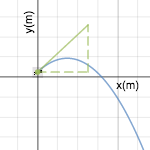
Here is another example of some prototyping for problem-solving in physics using desmos. [Click image]

Some features:

(1) Students make a guess about an angle and velocity that will work to get a volley ball serve. They get immediate visual feedback about their guess int he form of an initial velocity vector.

(2) Students then work the problem they’ve chosen I’ve added some scaffolding to do this. I’m hoping to get this into the activity builder, so when they place their two points, all other students can see other group’s attempts (both successful and failed).

(3) Right now, there’s a feature to check your answer–it shows the whole trajectory for the points you calculated.

(4) You can also change parameters of the task in the bottom folder (e.g., change length or height of the court, right now it’s set to men’s volleyball. You can also change the initial height to make it a jump serve)

This certainly isn’t great, but it’s kind cool.  Some of the cool things are:

  1. Some student choice (students decide what problem to solve based on their guess)
  2. Their is chance for feedback (with initial guess visualization, with overlay function from other students (once I get something working in the activity builder, and then with check your answer)
  3. It’s easy to extend and explore further questions.

Some downsides–

A. The scaffolding might force students into doing a particular way with less thinking and deciding for themselves.

B. Having the check your answer might lead students to just find a speed an angle without working it out.

What else?

Mid-Semester Feedback from Students: Helpful and Unhelpful for Learning

Every semester, I give the same 3 questions on a survey, always after 1st test, before they get it back.

What do we do in class that is helpful for your learning? Why specifically is it helpful?

Working problems in class is helpful. Seeing you do problems is helpful, then working similar problems. It’s also good to see and hear what other people think is correct and having to defend those answers.

The conceptual discussion along with the clicker questions are helpful with gaining a theoretical understanding. The example problems that we work as a class are also helpful.

I really benefit from the clicker questions and whiteboard work. It’s helpful to discuss to get a feel for the different ways to look at a problem and why an answer works. Whiteboarding helps me because get to practice while having opportunity to asks classmates and/or teacher questions.

Whiteboarding problems are more helpful.

We actually apply what we learn versus solely being lecture to. I think it helps because it assists you in getting familiar with the problems and knowing the purpose of them.

That we solve problems as a class but also ones with our group. Also clicker questions also help a lot.

Problems we do in class, helps me understand how to apply concepts. Clicker questions help as well, gets in more practice, and you go over them which helps. I enjoy how you give us chances to get things right like going over how to setup a good pictorial representation.

Clicker questions are helpful. Working problems is helpful. Builds a good foundation on the concepts.

Working in groups has been beneficial, because it allows for more one on one help from peers.

I am more lecture-oriented. Therefore, I find lectures and class discussion very helpful, but I do enjoy working in groups and find it helpful most of the time.

The mathematics portion of the class is helpful.

I like the labs and the problem solving on whiteboards. Using the whiteboards allows us to see our mistakes while we’re learning.

Clicker questions and discussing answers within our groups and the whole class. Working on problems on the whiteboard. Learning from other people, not just from the instructor.

Reasoning. Explaining in different concepts the concepts that we are testing with the clicker questions. Thinking about we can arrive at answer in different ways ensures that I’m not just memorizing answers.

Clicker questions, because we can think about it together and then discuss it with final feedback from the instructor.

Group problem-solving. This helps eliminate errors in steps and helps us remember not to forget certain steps.

Everything is helpful. I think what helps the most is clicker questions. I like the fact that we go over how get the answer and that you ask us about our thinking process.

Group work, clicker questions, and whiteboarding is all helpful. The best to learn physics is to practice and that’s what we do. It helps a lot because I need a visual aid.

I like how involved everything is and making everything group really lets us exercise our strengths.

Clicker questions-I find this helpful going over in class what the correct is vs the wrong answer.

Group work is helpful and we are able to talk to each other and strategize.

Group work while you walk around to check on / help groups. This helps because I have other people that can correct me and point me in the right direction, and when I help other’s in my group I end up knowing the subject matter better myself.

Clicker questions and group explanations helps me understand the material. When we do whiteboards, if watch someone who knows what they are doing, it helps me understand instead of not knowing what do, and then I can try to attack the next problem with the marker.

The labs. They give me a tangible sense of problems and enhance my view of the problems.

Working the math formulas out in a group. It’s helpful because you can see how other do it plus ask questions.

Practice problems are very helpful, because we continue to set up and solve problems, so I know how to do it for the test.

The overall style is helpful for learning– going from concepts, to seeing if everyone understands those concepts, to quizzing those concepts, to applying those concepts. It flows well and sets you up for success.

I love clicker questions. The positive feedback gives an immediate chance to correct misunderstandings.

I like group work and multiple practice problems. We get multiple interpretations and strategies to solve problems.

Clicker questions are helpful. Mostly when we discuss our answers as a group and as a class. Problem solving helps and working as a group helps me compare my ideas with classmates and makes me work my best.

I like the hands on stuff with labs. I have a hard time with the reading and comprehending so, when I see it visually or do it, it really sticks.

What do we do in class that is helpful for your learning? Why specifically is it helpful?

So for I have not run into anything unhelpful. I don’t like working in groups, but it definitely helps me learn so I need to get over it.

(Blank)

I think mastering physics is a useful tool in some cases, but not all. I do not like relying on the computer program for homework and reading quizzes.

I often feel like I’m working on my own and pulling teeth to have the group work done together. I leaves me feeling overwhelmed and responsible for others’ learning.

Nothing.

Too much group work can be unhelpful, because it can give me a false sense of confidence.

Labs are not helpful. I would rather do more clicker questions or problems then do lab. Lab confuses me.

Too much down time between activities.

Everything helps.

The length of this class i hard. Maybe a 5-10 break? May help us stay focused.

Group work is helpful, but if we are going to do so much of it, then she should do group quizzes/ tests. Also lab does not really pertain to help with what we are learning in the book.

(blank)

(blank)

I wish we could stay with the same groups. Why fix what’s not broken.

Nothing

Not enough mathematics with explanation.

The groups are not balanced. I think it’s unfair for some groups.

I can’t think of anything.

Everything seems helpful.

Occasionally, group work can be unhelpful.

So far, everything is working out well.

There is nothing specific that is unhelpful. I do think groups are not evenly balanced, knowledge-wise, and that can lead to frustration.

N/A

The labs aren’t unhelpful, but I do not feel like I’ve retained knowledge from them.

Can’t think of anything bad.

I would like if it were more clear what pages to read for each reading quiz.

I dislike the labs-Although it may be helpful, I found myself stuck when it came to relating it to the rest of class.

I feel like we need more than an hour for tests. Slow workers need more time.

Whiteboard exercises we do as groups are unhelpful because it seems we could use more examples as a class in order to be ready to break into groups.

Group work is good, but I feel like I need to understand material before I can jump in with my group.

Is there anything else that’s been on your mind? Something you want to tell me? Something we don’t do in class that you wish we did?

[Private]

My understanding on HW consistently lags one class behind. I never seem to understand the HW until the class after it’s due. as it stands I’ve come to accept losing points on HW in order to cut down the time it takes to finish. Maybe we could move each assignment back a class/ day which could help.

It’s been a good class so far. HW is a little frustrating at times. I like the format of mymathlabs better than mastering physics.

Mastering physics is a struggle.

None

[Blank]

Online HW can be very picky. The extra learning that we can do is hard, because I feel like it picks bad problems. It sometimes picks problems we haven’t even read yet.

Having HW due the day of the test was frustrating.

N/A

I hate Pearson! The program is not consistent. Adaptive follow ups are ridiculous. Some of it is just too complicated.

Can re review commonly missed online problems? Too many online assignments, and the site doesn’t work fully on an ipad.

Hunger gets intense during this three hour class over lunch.

I feel a test review would be helpful.

[Blank]

I think we could do labs more together as a class than in our labs groups.

Just more math when explaining. Learning thing without math is more challenging and leaves me with a weaker understanding of the material.

I don’t like the adaptive HW… it gives you problems that are 4x harder than the original ones you missed. I think it would make sense to give you easier problems first, and then give you harder ones.

Online HW is stressful. I wish personally I had more free time to come to tutoring or office hours, but I don’t. This class is awesome though, your really care, which I appreciate.

I appreciate this survey.

I feel a review before the test would be very beneficial. I felt like I didn’t know what to study.

We should lecture more and do lab less. Or more practice problems on our own so it’s more like a test scenario.

You are one of the best professors I’ve ever had. I appreciate it.

[Personal]

The adaptive follow ups do not get tested out unless you get 100%. Maybe 90% would make more sense?

I wish you posted the powerpoints to study from. I wish we had more time for tests.

I like group work, but I wish we did some, where we work alone and then check with our group.

I HATE online homework. The computer takes off points, but can help you understand or explain what you did wrong.

Mastering Physics makes me want to throw a fit. Knowing if the answer is right or wrong is good, but mastering physics can’t me WHY I’m wrong. Also, since I commute, your office hours are not convenient.

Maybe you could go over some of the problems from our HW.

The HW gets really frustrating,.. a bit is when don’t cover everything in class, so we have to learn some on our own. Teaching myself does not work well.

What if you did the Buggy Lab After Position Counting Circles?

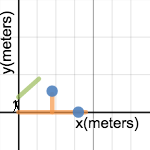
So I’m wondering what if you started with position counting circles (e.g., in context of highway travel (miler per hours and mile markers). In the context of counting, the teacher enters in the count into desmos so that a graphical view of the count (position vs time) is projected. Of course, you pause for discussion about the count at key times. Students get to see the graph being made and its trend, (wrong) counts that buck the trend. Whoa what happened to car when the graph and count went negative (Maybe it crossed a state line?). On other counts, stop before close to the end and ask, “Who will be the person to who counts the moment where the car crosses the state line? How did you figure that out?” Whatever. Ask questions about why the graph looks the way it does…

The desmos count file might be something like this (click the image), but with position instead of velocity:

Then: What if after practice with circle counting, class discussion around that, etc.– you gave students a buggy, a buggy highway, and starting position and asked them to design an experiment to figure out “the count” for their buggy and what it’s graph looked like. You would probably want to require them to collect enough data points that they can make a graph.

Of course, since it’s in desmos, you’d use the desmos’ activity builder, you’d overlay their graphs at the front of the room. More discussion around that. At some point, depending on your class, you’d move to equations for the lines.

I’m just curious how that would be different than starting with the buggy lab– specfically using counting circles and graphical displays of counting circles as the lead in into the buggy lab.

Possible thoughts you might have:

  • That’s the worst idea ever, you need to start with phenomena. This is a physics class!
  • Even with starting with “mph” (as an everyday idea), that idea can still to too hard for some students (haven’t you see that video!)
  • Giving them the common experience of the “count” and seeing the graph might make the instructions for the experiment grounded. I can imagine students feeling they know what they are supposed to be doing, in a way that hasn’t required lots of vocabulary or direct instruction.
  • Asking about the count for the experiment is “babying” them, you need to introduce position, change in position language from the start.

Early Prototype of Problem-solving Lessons using Desmos Overlay

So, I’m in the very early stages here, both in terms of thinking and development, but here’s my attempt at a problem-solving activity using desmos. I realize that this is focused on very mechanical aspects of problem-solving here (picking knowns and knowns, doing calculations, etc), but I’m just getting started here.

The things I’m trying to capitalize here is on students getting feedback from other students that is helpful (but not too helpful), accessible at the right time (it’s ready for you when you want it), and easy for students to give.

So here’s my not so-great prototype:

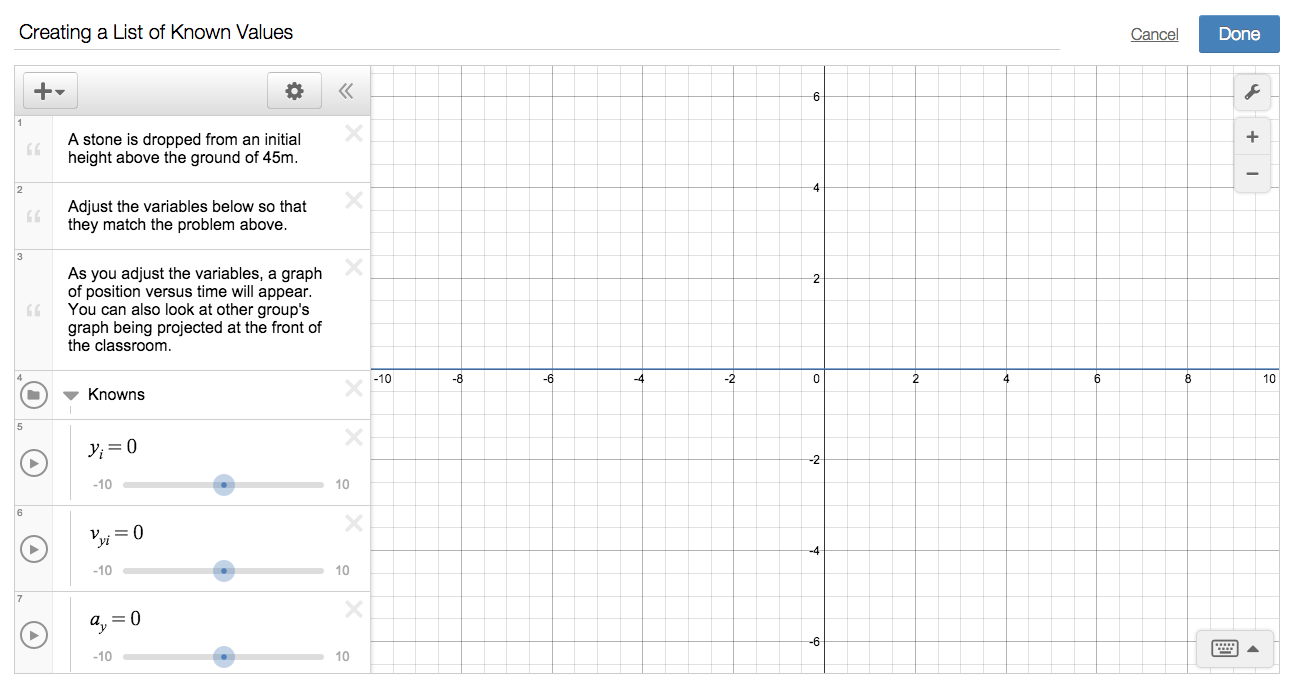
Part 1: Students get a kinematics problem, and they are asked to adjust adjust their known information about the problems using sliders. A graph of position versus time is automatically shown for the values they pick.

Screen Shot 2015-09-16 at 2.03.54 PM

Feedback: Projected at the front of the room is an overlay of all students’ graphs. Students get to see the overlay of graphs, (not the values that each group picked).

Students might notice their graph is different than others. Or the teacher might notice that half the class has one graph and half has a different.

Part 2:  Students get asked a question. The question students get is, “Explain how your group knew what each of these values should be based on what you know about the stone.”

Feedback: As students write their answers, other group’s answers immediately appear below their own.

Part 3:  Students get a new blank graph, and are asked to pick a time and then calculate the position. They enter their time and position in a table, and their point appears on the screen.  You might want students to do 2-3 points depending on time and how many groups, or after first point is done to look at the overlay and to pick a point that hasn’t been done yet.

Screen Shot 2015-09-16 at 2.16.31 PM

Feedback:  Students get to see an overlay of all the points. I’m imagining a couple scenarios: Two students pick the same time, but get different positions.  Or their is an obvious outlier to the trend.

Part 4:  Students get another question that asks how they went about solving for the position. Students get to see what others students’ said.

So like I said, this isn’t great, but here are some things I like:

  1. Students get feedback about their known values by how the shape of their graph compares to the shape of their graph (not the values themselves)… [Side: makes me thinking follow up question might be about why shape of graph makes sense for the problem]
  2. Students get a tiny bit of choice in choosing what time to pick. They get feedback about how their answers compare to others, but it’s not simple as “I got 3. What did you get?” Once again it’s in the graph.
  3. In having choice and a graph, students might choose to explore interesting questions (negative times, big times).

Some obvious improvements:

  1.  Pick a better problem.
  2.  Ask better follow up questions.

But I’m more wondering about structure. So tell me, what structurally would make this better in terms of student engagement, student interaction, or student feedback? Or tell me why this structure is completely awful, and suggest a totally different structure that would be better. I spent ~10 minutes making the activity file and ~15 minutes writing this blogpost, so I won’t have my feelings hurt.

First Exam: Success Rates in the 2 Stage Kinematics Problem

On our first test, students had a two-stage constant acceleration problem. It was not terribly difficult (starting from rest and the quantities given were all integers), but two-stage problems always mess up students. Students were given the times for each stage and the acceleration in the first stage.

Here’s two interesting break downs

Break down by Correctness of Velocity vs. Time Graph

In knight’s book, they call a setup to 1D acceleration problem a “Visual Overview”. In the visual overview, students must include a pictorial representation and a list of values and may include a motion diagram or a graph sketch.

  • If students had a correct velocity vs time sketch, they had a 90% success rate in finding the total distance.
  • If students had no velocity vs time sketch, they had a 60% success rate in finding the total distance.
  • If students had an incorrect velocity vs. time sketch, they had 0% success rate in finding the total distance.

Breakdown by Approach to Finding Distance

Knight’s book teaches both graphical methods and equations methods. In class, I really encouraged working the problem both ways.

  1. If students approached using graphical method, they had a 83% success rate.
  2. If students approached using equations, they had a 61% success rate
  3. If students approached using a table, they had a 50% success rate (only 2 students)
  4. If students approach was mostly math scribbles, they had a 0% success rate.

This particular problem was very amenable to graphical approaches, because time information was given. I’m not sure these two trends would hold for every problem, but Kelly O’Shea would definitely say here, “Graphical Approaches for the Win!”

Edit:  Of course, students who solved in both with equations and graphs had a 100% success rate (4 students)

Common Errors:

While not having a good “setup” was a common error, other common mistakes included

  • Implicitly treating all or part of the problem as a single stage of constant acceleration (the trap in using equations)
  • Using constant velocity approaches for constant acceleration (e.g., using v= d/t and/or treating acceleration as velocity)
  • Confusing position and velocity in a graph or calculation

Overall the test offered to few challenges for some students (1/3 As, with three 100s), and offered two few opportunities for some students to display partial understanding (2-3 really low failing grades). Average was a high C, and Median was a low B, which seems about right for the first exam.

Learning More about Using Desmos in a Physics Context

With broken ankle, I’ve been spending more time learning how to use desmos. I’m not really using these with any students yet, just messing around and seeing what’s possible.

Simulations:

Here is a simulation for a projectile motion question we are going to work later this week. It shows the trajectory and velocity vectors (and components) for a dog jumping. You can just hit the play button to watch, or you can change the parameters by opening the “parameter” folder. For example, in class, we are going to vary the angle.  @Desmos on twitter showed me that I could add a picture (hence the dog).

Dynamic Problem Representations:

Here is a problem a student was working on from our text: You can adjust the parameters to change the problem, or even shade the area under the curve, and adjust your guess for the final time.

Manual Curve Fitting for Labs:

Below is a draft of what a free-fall lab might look like in desmos. One thing you can do is use sliders to manually “fit”, which is pretty cool. But you can also have desmos find fits.


Activity Builder:

I’ve also more recently played around with their activity builder, which is pretty cool. In the activity builder you can create dynamic “worksheets” for students to work through, where you can ask questions, present texts, or give them graph/math to work with. Students access your worksheet at student.desmos.com and type in a code that is associated with your activity.

The really cool thing about the activity builder is from the teacher side: you get real-time visuals of student work. You can look at thumbprints of students graph or answers to check progress and compare, or you can enter into an individual students screen to look more closely. When students answer questions, you can also choose to have other students’ answer come up (or not).

But the really, really interesting thing is the “overlay” function, where you can take ALL the students’ graphs and overlay them on top of each other.  You can project the overlay to students.

Below I built a draft of a desmos activity where students could enter in data and then graph acceleration vs. force. Each group would have a different mass, so the slopes of their lines would vary. Since I can show an overlay of all students’ graph, I can project this back to the class. The activity file has questions students answers about their own graph as well as the overlay of graphs, which others groups can see as they get answers.

Screen Shot 2015-09-14 at 3.53.58 PM

(https://teacher.desmos.com/activitybuilder/custom/55f6be3044155e584187c169)

I think this setup is pretty awesome–making collaborative lab experiences more meaningful by making formative assessment easier, increasing student-student interactions about the content, making comparisons real-time and easy.

So far, I’m pretty excited to continue working with desmos, both to see what I can do with it and to see in what ways it might be a useful technology in my classrooms.

Learning Assistant Seminar: Talk Moves and Practicing Echo-Probe-Toss

Pre-class Reading Summary:

On Monday, in my learning assistant seminar, students will have read a chapter mostly about two things:

First: “Common Reactions to Student Answers”

  • Confirming (“That’s correct! Good Job”)
  • Denying (“Nope, not quite.”)
  • Ignoring (“Hmm… Anybody else have an idea?”
  • Arguing (“Well, it couldn’t be that because _____”)

Second: Alternative talk moves:

  • Asking student to say more (“Say more about that!”)
  • Pressing Student for Reasoning (“Why do you think that answer makes sense?)
  • Re-voicing the Student Idea (“OK, so George thinks that _____”)
  • Asking others to weigh in (Does anybody either agree or disagree with George’s idea and can say why?)
  • Asking others to re-voice (“Does any body think they understand George’s idea and repeat what his idea was in their own words?)
  • Prompting for More Participation (So, we’ve heard from a few folks who said ___. What else has an idea about what could happen?)

This section also includes a revisiting of wait time, which they have already read about, as well as a few other things.

Examine and Share Out Cases (30 minutes):

Our day will begin with groups of 2-3 each getting a “case” (just a two line transcript, where a student gives an answer and a teacher responses).  They have to first identify the type of “reaction”, explain what possible downsides that reaction might have, and then second propose an alternative response, identify what type, and what possible benefits there could be. I have each case as handout for the group.  But I also have a powerpoint, so students will just have to be prepared to talk about the common reaction over the power point slide, but I will have them prepare on whiteboard for their alternative response.

If it seems productive or time-permitting, I have following whole-class discussion questions prepared:

A.  What feelings–either our own or from students– lead us to “react” to student answers rather than responding more deliberately?

B.  What other feelings (possibly about student as learners or ourselves as teachers) can we nurture to help us “respond” more deliberately?

[With both of those questions: What will make it hard for you personally to respond rather than react?]

An alternative discussion question (if it’s leaning this way is):  Is it ever OK to respond by confirming or denying? If not, why not? If so, what’s a situation where you think it would be OK?

Brief Direction Instruction (15-20 minutes)

Triadic Dialogue:  I will briefly review this common form of classroom interaction (from a previous reading), where a teacher initiates dialogue with a question, students responds with a brief answer (often one word), and the teacher evaluates its correctness. This is sometimes called I-R-E.

Then I will introduce a different kind of dialogue that can help us practice getting away from I-R-E. The dialogue is still rather teacher controlled, in the sense that it’s about moves the teacher makes, but it’s a good stepping stones for my students.  For my students, I call it “Echo-Probe-Toss“:

Echo: (You state back the students’ name and what their answer was), “George says he think the net force is up”

Probe: (Ask for reasoning), “George, why did you think the net force is up”

Toss:  (Revoice and put the conversation back to the class): “OK, So George says the net force is up, because the elevator is needs an upward force to keep moving up.  Who else in class said that the Net Force is up, and could say why they agree with George?”

The first thing I will have students to do is discuss with a neighbor which talk moves we just talked about could go with each stage. For example,  “Say More”, or “Pressing” could go under probe.  We will make a list at the board.

Echo-Probe-Toss Game (30-40 minutes):

Then we practice as a class with mock “clicker question”. The rules of the game are– “students” must given honest answer, but when called on they must only give the answer (don’t give reasoning unless the teacher probes). The rules for teachers are you must use the students’ name on each move.

The clicker questions are a mix of silly questions (“Which super power would you most want to have?), biology questions (“when you exercise and lose weight, where does that weight go?”), and questions about LA pedagogy concepts (“Which talk move do you think will be the most useful in the class you teach?”).

Each student will get a chance to practice, and we will pause for discussion as seems helpful. In past, it’s been helpful to point out different flavors of re-voicing that come up (mimicking exactly, vs paraphrasing, vs highlighting, vs. enhancing). It’s been useful to talk about what to do when you haven’t actually understood what the students just said—maybe you zoned out or maybe what they said was confusing. It’s been useful to highlight different ways to “toss” it back as well. Sometimes, even unpacking and comparing specific phrases have been helpful– Why did that last toss back feel very natural whereas some of other ones felt awkward?

I’m still learning to facilitate this:

For me, facilitating this is actually quite tough:

  • Deciding when to pause and discuss (too much, you ruin the flow; too little, you miss learning opportunities),
  • Enforcing the rules (students help with this, though),
  • Deciding how long to let each clicker question go (some lead to interesting conversation which you want to let go, but probably shouldn’t; others fall flat quickly; I want make sure everyone gets a chance, and that everyone gets enough rounds in on a single question)
  • Intervening when someone needs quick help (e.g., a reminder to say a name, rather than a pause and discuss)

One other thing I have a hard time deciding is, when to not enforce the rule when it seemed like a good thing is happening. For example, this happens usually when the “teacher” does a few good turns and the conversation really starts going, and students start just really talking about it, to each other, without any teacher moves. I try at least once to let it happen, and then talk about it–How good facilitation (and good questions) can lead students to actually just start really talking about something? BUT I can’t do that every time, especially if it happens right at the start of a clicker question, because then the “teacher” isn’t getting enough practice with the talk moves.

Striking the right balance is hard. I’m getting better every time, but I still make lots of non-optimal decisions. Right now, thinking about how hard this is for me makes me think about how some researchers I know would probably want to analyze these rehearsal spaces.

First Challenge Lab: Buggy-Cart Collision

Our final “lab” for out Unit on 1D kinematics was a challenge lab where students had to apply both data collection/analysis and problem-solving skills to make a prediction. Students were given a constant-velocity buggy and a low-friction cart on the ramp. Students had to collect data to build models for each that could then be used to predict where to place the cart on the ramp so that it crashes into the buggy driving by the bottom of the ramp. After building their models, students were given the starting position for the buggy, then asked solved the problem and check their predictions.

We had originally wanted to do the  marble rolling down the ramp and into seat of the buggy. The small marble hitting the seat is much cooler than just a collision of two larger objects, but the marble limits the tools students can use. Marbles are too small to be picked up by motion detectors. While marbles can be used to mark position and time with photogates, you cannot easily measure the instantaneous speed (because you don’t know what width of the marble is blocking the sensor very easily). Because we had wanted students to decide what tools they’d like to use, we went with carts in planning out the challenge. That way students would be able to choose motion detectors, stopwatches and metersticks, or photogates to collect data… all tools we’d used previously.

In the challenge labs, students were supposed to first spend time planning their data and analysis (checking it with an instructor before getting equipment), then carry out data collection and analysis, and finally sett up the problem-solving strategy before getting the release point.

Students were supposed to get 2 hours to do all this. However, we had fallen behind (partially due to activities taking too long and me breaking my ankle), so we spent the first 1.5 hours (of a 3 hour class) discussing free-fall and working whiteboard problems. This time was well worth it.  Students got a much deeper understanding of acceleration and much needed practice with working with velocity vs. time graphs to solve problems. We (the other instructor piloting the new curriculum and I) knew we were going to have less time, and so decided with only 1.5 hours to do an abbreviated challenge lab.  Instead of each group having their own setup, we had one big demo setup– a 2.2 meter track with a cart. As a whole class, we talked about what information we would want to know about the buggy and the cart and what different ways we could figure that out. After discussing various options, we opted to use the motion detector for both. The logger pro graphs for position vs.time and velocity vs. time for both cart and buggy were left projected at the front of the room.

The downsides to this abbreviated challenge lab were (1) less student agency about how to collect and analyze /data, and (2) everyone solving the same problem rather than individual problems. The good part was, for a first challenge lab, it got students comfortable with the format.  We did the “deciding how to collect and analyze data” together and they had to solve the problem with their group. I think it significantly reduced the stress that students might have otherwise felt.

Some groups were still a bit stressed, mostly in struggling to turn the actual scenario into a physics problem that could be solved. With HW and whiteboard problems, they get practice turning word problems into physics problem. It was a good struggle, but it made me think that we need to do more whiteboard problems that are quantitative setups rather than word problems. The truth is students need practice with both, but for students to feel confident going into challenge labs, we need better balance.

Every group was able to be successful in making their prediction. Most groups just need conversations reminding them of things they already knew. “Have we solved problems similar to this one in class?”, “What approach did you take in that problem?” “Will that approach work here?” Other students needed conversations about being more organized or systematic. “I see you’ve listed some of the information for the buggy and the cart. When we solved problems like this, what did a good list of knowns and unknowns look like? Does your list meet that criteria yet?”  “In the textbook, you always have to start a problem with a visual overview–a picture, a motion diagram,or a graph. Which of those do you think you could start with?”

About 1/3 of the groups solved for the starting position of the cart using the area under a velocity vs. time graph, 1/3 with an equation, and 1/3 solved using both. Even though every group solved the same problem, most groups were still pretty excited to see their predictions work out. I think one thing is that since the cart accelerates gradually (15 cm/s/s in our setup), it intuitively doesn’t look like they are going to hit at first. You are looking at it going, No Way, and then because the cart has picked up speed, it quickly closes the gap. I think that suspense and surprise helps students to be excited.

I wish I had gotten some pictures or videos, but crutching around class has made me less mindful of that.

Free-fall Circle Counting: I can’t imagine ever not doing this

Today in class, we did a few circle counts for free-fall. [I’m pretty sure I stole this idea from Frank Noschese, who probably stole it from someone else Sadie Estrella, who blogs about it here. I can’t seem to the find the found the blog post where Frank wrote about it].

Of course, counting circles is more from elementary math classes, but it works for college physics really well. So with free fall, students in a circle “count off” the velocity of a thrown object each second, using 10 m/s/s change.

Easy ones might be like 30 m/s, 20 m/s, 10 m/s, 0 m/s, -10 m/s, -20 m/s, -30 m/s.

Medium ones like  25 m/s, 15 m/s, 5 m/s, -5 m/s, -15 m/s, – 25 m/s

Hard ones like:  18 m/s, 8 m/s, -2 m/s, – 12 m/s

I had student “circles” look more like motion diagrams, so a big “U” where the positive velocities head one way and the negative velocities head back down. I didn’t spend too much time on this, but we certainly could have. The activity was pretty enlightening for students, but what this activity actually did was provide us with fodder for later sense-making. Our conversations all day were always referencing back to the counting activity.

For example, one clicker question later in day was what does velocity vs. time graph look like for an arrow shot straight into the air and falling back down. Our discussion of the different answer choices was immensely helped by talking about it in relationship to the circle counting. “We keep counting down by -10, the count never turns around”.  Another clicker question about the acceleration at the top, circle counting really helped. “There’s never a time where you don’t count down by “10”… even if you are the person who says zero… you had to count down by ten, and the next person had to count down by 10″. No one is allowed to say the same number the previous person said. The final question it helped with was, “A ball is dropped from a height of 45m and takes 3s to hit the ground. What’s the instantaneous speed just before impact?” Tempting to say 15 m/s.

Anyway, if you are thinking of trying this. I highly encourage it. It forces participation in good way. Formative assessment is pretty easy. It provides lots of opportunities to “stop” and discuss issues that come up.

Notes:

  1. I think it’s probably important for students to say the units and to enforce it (and maybe even say “moving at a velocity of – 15 m/s”). Later students will start incorrectly count free-fall distance by 10m (each second). This came up in our 45 m in 3 seconds clicker question, where at least one student arrived at answer of 15 m/s… by counting down from 45m three times to 15m.  We had to talk about how that would be constant velocity of – 10 m/s.  Forcing them to say units or the phrase won’t eliminate this, but it can’t hurt?
  2. Plan ahead on what examples you want to give, what possible “stop and discuss” issues might come up. A good time to discuss is after mistakes, or even after any long pauses. Students tend to pause more when going from positive to negative, especially if it’s like 2 m/s to – 8 m/s.  In skip counting good questions come from, “How did you know to say __ without counting?” The discussion can be about strategy, but it can also be about keeping it connected to what’s physically happening.
  3. If doing it again, I would definitely do a few with the whole class, but then maybe give them examples to work out in smaller groups, and then “present” their motion diagram count. The whole class is nice, because it models and you can have those “stop”, but small group might work well, too.

Further extensions of this activity I didn’t do, but would consider for next time could include:

— Skip counting, like only saying the velocity every so often (having students count time in between)… so a drop from rest, that only counts velocity every 3 seconds would be First person says “0 m/s”, Second person just says (1s), Third person says  (2s),  But next person has to say” -30 m/s”… etc,… so (4s), (5s), then “-60 m/s. “

— Counting in intervals other than one second… I think 1/10th of a second is pretty important.

— Counting with other accelerations.

–[Much later]  Adding in distances:  Like for an acceleration of 2 ft/s/s from rest, you would count “0 ft/s”, the next person would count “2 ft/s” and take 1 ft step (because average velocity was 1 ft/s for that s”… then the next person would say, “4 ft/s” but would take 3 ft step, etc.  Our tiles are 1ft, so this wouldn’t be hard. It’s like a live motion diagram.

Week 3: 80% Wrong on a Clicker Question [Sign of Acceleration]

Last week, students worked through a lab using photogates to investigate how the speed of a cart changes as it descends a ramp. We didn’t have much time to talk about it too much because my broke ankle situation meant having to cut class early to see the doctor. Most students, however, were still able to make good interpretations of the intercept and slope of their linear equation for velocity vs. time. This was helped by having students to a “quick and dirty” experiment to figure out how much speed the cart gained in traveling 1 second (all groups adjusted the location of the 2nd photogate until it measured 1 second later from the first). It was also supported by asking students to think about what value was typical for the first photogate each trial, and why that stayed relatively constant. Both of these gave them something to hang their hat on when interpreting slope and intercept.

In this lab case, the intercept and slope are both positive, so today we ventured into talking more specifically about the sign of acceleration in various cases. Here’s how the day started:

  1. Warm up to review the photogate lab:  Question was “if your linear equation from our last lab had been v = 15 cm/s/s t + 10 cm/s, (1) how fast was the cart moving through the first gate, (2) how much speed does it gain each and every second? In asking students to say how they knew, we ended up drawing the graphs and talking about slopes and intercepts.
  2. A very brief mini-lecture to review definition of acceleration from their reading, how it connects our lab and the slope of velocity vs time, and some modeling of how to interpret the meaning of acceleration.
  3. A clicker question where students find acceleration at a particular time from a v vs t graph. Lots of discussion was needed here. Since the graph had an intercept, many students merely calculated v/t rather than dv/dt.
  4. A similar clicker question where students find acceleration for a graph but with negative slope.
  5. A very quick review of sign conventions for velocity vectors that we’ve established. (Knight in the algebra-based text always has positive be to the right).
  6. A clicker question with a motion diagram: the object is on the right side of the origin, slowing down as it approaches the origin. Students are asked to identify sign of velocity and position. Some discussion here, but pretty good here.
  7. 2nd clicker question with same motion diagram asking about sign of acceleration. About 80% said velocity was negative, which is incorrect.

What do you do when 80% of students have the wrong answer in a clicker question? My move here is to draw specific attention to a tool. I didn’t ask students to discuss. I didn’t lecture. I asked students to work in groups to draw a velocity vs time graphs for the situation, and to use the idea that the slope of velocity vs time. Many groups needed help with correct velocity vs time, but most of it involves reminding them that we had just said in the previous clicker question that the velocity was negative.

We drew a consensus velocity vs. time graph at the front and agreed that since the slope was positive, the graph implied that acceleration was positive. Now and only now I asked students to tell me why 80% of them had answered the acceleration was negative… it was the first time in class that students really opened up about wrong ideas… here’s what we got.

  1. “I thought that since the velocity was negative, the acceleration had to be negative”
  2. “I was thinking acceleration is v/t, so a negative velocity divided by a positive time is negative”
  3. “I was thinking that slowing down has to mean a negative acceleration, it’s taking away speed”

Then only then did I ask for, “How can we make sense of why the velocity vs. time time graphs says that acceleration is positive.” We got lots of good ideas here

  1.  Slowing down should be negative acceleration, but your velocity is already negative… its like the two negative, means the acceleration must be positive to counteract the negative velocity.
  2. You can’t think of acceleration as v/t, it’s about the change in v; we can see in the graph, that even though the velocity is negative (below the axis), the change in velocity is always positively going “up”
  3. If it had like -30 m/s velocity to start and later you have -20m/s velocity, it’s almost like it gained +10 m/s velocity… it’s less in velocity debt, and a positive acceleration helped get it less in velocity debt.

I added my vector interpretation of how acceleration “changes’ velocity vectors by either “widdling them down” or “pulling them out”, and how the sign of acceleration is just about which way the acceleration vector points.

I think “order” matters here… while one-on-one in office hours, I have and still would ask student to explain to me their thinking about what I know to be the wrong answer. Often times, I say back to them their idea and why it makes sense, and then say, “I want to tell you about another way of thinking about it. Hear me out, it’s different than your idea, but I want you to understand my idea like I think I’ve understood yours.”

In class, however, I want students to get in the practice of using tools we’ve developed. We spent all that time talking about acceleration as slope of velocity vs time, so I want us to use that. Once we were pretty sure we were almost all wrong, sharing your wrong thinking was less risky. I encouraged students to share their previous wrong thinking through an analogy I learned (I think) from David Hammer. To tell students to, “You know when you sometimes meet someone new, and you immediately don’t like them, but you don’t know why?” I tell them that having ideas in physics is like that… sometimes you have an idea, but you aren’t sure why you thought it. Once you figure out, “why” you don’t like the person (e.g., maybe they remind you of someone), you can let go of not liking them. We need to figure out “why” it’s so tempting to think that acceleration was negative.

Blog at WordPress.com.

Up ↑